

A VPS plan’s vCPU count tells you how many threads you get, but actual speed depends on the processor, its clock speed, and how physical cores are shared between customers. Without measured scores, comparing CPU performance is a challenge.
We offer three VPS families on our current platform. GP3 is our general-purpose Linux VPS, WGP3 is its Windows counterpart, and VD1 is a Linux virtual dedicated server. Each runs on a different AMD EPYC processor, with different peak clock speeds from 3.0 to 4.3 GHz. GP3 and WGP3 share physical cores between customers’ VMs, while each VD1 vCPU gets a physical core of its own.
We wanted to be able to see how these differences add up in measured numbers. So we benchmarked every plan in all three families with PassMark, ran each test on three live production servers, and added the averaged scores to our VPS plan tables.
Why PassMark?
We wanted a benchmark that runs on Linux and Windows and gives us a common reference for CPU performance across plans from 1 to 48 vCPUs. PassMark runs on both operating systems, and its public database covers thousands of processors, including the EPYC models we use.
We considered other benchmark tools, but they suit different jobs. SPEC CPU is commonly used for comparing server platforms, which is why our dedicated server guide used vendor-published SPEC results, but it was less practical for testing every VPS configuration. The Phoronix Test Suite is excellent for examining specific workloads, but it would have meant many more tests to run and explain. Geekbench 6’s multi-core test has all the threads cooperate on one shared task, which its own benchmark documentation notes may not scale as well as giving each thread independent work. On plans with up to 48 vCPUs, overall throughput was what we wanted to measure the most.
We use two PassMark scores.
- Single Thread measures how fast one CPU thread works. It’s important for tasks that largely run on one thread at a time, such as a single PHP request.
- CPU Mark combines results from tests including calculations, compression, encryption, and sorting. Its multi-threaded tests use all available CPU threads by default. We use the score to compare performance on those tests as vCPUs are added.
How we tested
Each family runs on its own Proxmox cluster, a group of physical servers (nodes) that host only that family’s VMs. We ran PassMark once for each plan on three of those nodes, labelled HN1, HN2, and HN3. The CPU Mark scores in the GP3, WGP3, and VD1 plan tables are the averages of those three runs, and the complete results table lists every run, including the Single Thread test results.
All three nodes were serving customer VMs throughout, so each result includes whatever the other VMs on that node were doing at the time. How much those neighbours could affect a test depends on how each family allocates CPU cores.
On GP3 and WGP3, customer VMs share the node’s physical cores. The hypervisor hands out core time as each VM needs it. GP3 allows up to five allocated vCPUs per physical core across a node, and WGP3 allows up to four. We monitor utilisation and add new nodes as the clusters grow. On VD1, each vCPU is assigned a dedicated physical core (2 threads) that no other customer’s VM uses. Our VPS platform post explains the policies in more detail.
The results
| Family | Host CPU: cores; base / max boost | Plan sizes | Average Single Thread across plans | Largest plan: average CPU Mark |
|---|---|---|---|---|
| GP3, shared Linux VPS | EPYC 9474F: 48; 3.6 / 4.1 GHz | 1–32 vCPU | 3,036–3,149 | 66,384 (32 vCPU) |
| WGP3, shared Windows VPS | EPYC 9274F: 24; 4.05 / 4.3 GHz | 2–48 vCPU | 2,767–2,892 | 65,520 (48 vCPU) |
| VD1, dedicated-core Linux VDS | EPYC 9734: 112; 2.2 / 3.0 GHz | 1–32 vCPU | 2,226–2,318 | 50,078 (32 vCPU) |
The host CPU column gives AMD’s specifications for the processor in each node. The scores come from VMs running on those nodes, so GP3’s 66,384 belongs to a 32-vCPU VM, not the whole 48-core processor. WGP3 comes in two memory configurations, with 3 GB or 4 GB of RAM per vCPU, and the charts plot them separately.
Single Thread holds steady across plan sizes
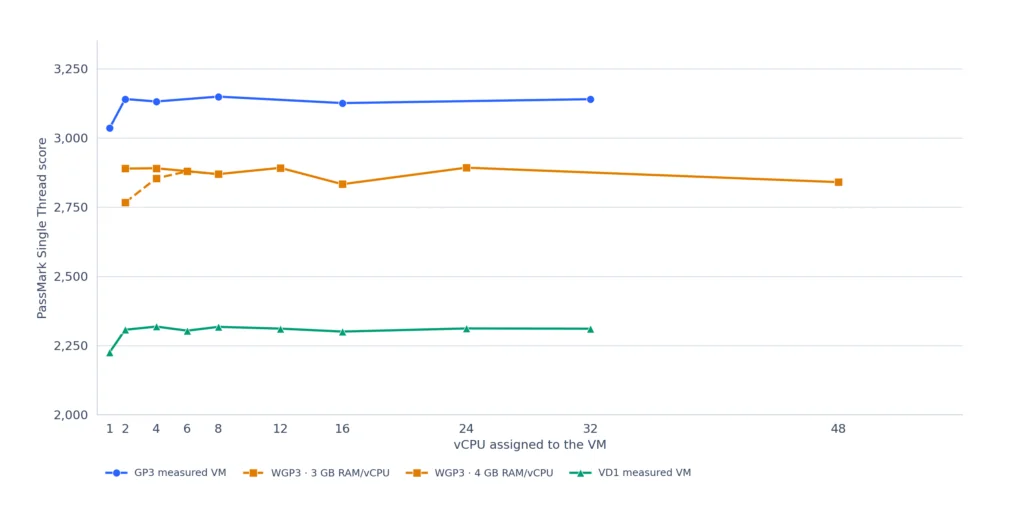
Chart 1. Average PassMark Single Thread scores by vCPU count.
A bigger plan doesn’t change the processor each thread runs on, so we expected Single Thread to stay level across plan sizes, and it did. Leaving out the smallest plan in each family, GP3’s and VD1’s averages each stay within 1%, and WGP3’s within about 2%. Those smallest plans score 3 to 4% lower.
So single-threaded, CPU-bound work may run at much the same speed on an 8-vCPU plan as on a 32-vCPU plan in the same family. A bigger plan adds vCPUs for running more work at once, and CPU Mark shows how performance in its tests grows with them.
WGP3 had lower Single Thread scores
WGP3’s Single Thread results surprised us. Its EPYC 9274F has the highest boost clock of the three, at 4.3 GHz, yet it scored about 8% below GP3. We checked the host hardware, the BIOS virtualisation profile, and the Windows VM configuration against AMD and Proxmox recommendations.
To check how the same VM performed with Linux, we evacuated HN3, moving its customer VMs to other nodes, and booted the same 48-vCPU WGP3192 test VM from an Ubuntu 26.04.1 live ISO, still running under KVM, the hypervisor Proxmox uses. On the empty node, Ubuntu scored 3,318 in Single Thread and 72,097 in CPU Mark, close to PassMark’s public averages for the EPYC 9274F (3,231 and 72,272 in October 2026). Public results come from mixed systems, so this is only a broad check, but it suggests the hardware was performing normally.
With customer VMs back on HN3, three more Ubuntu runs averaged 65,602 in CPU Mark, almost identical to the 65,520 Windows averaged across the three nodes. The drop is consistent with competition from other VMs, though the Ubuntu and Windows runs had different background load. Single Thread was the exception. Ubuntu held at 3,210, about 13% above Windows at 2,840.
With the hardware performing well under Linux, the per-thread gap points us towards the Windows guest configuration, how Windows schedules work across the VM’s vCPUs, and how KVM places that work on physical cores. Our investigation will continue.
How CPU Mark scales with vCPU count
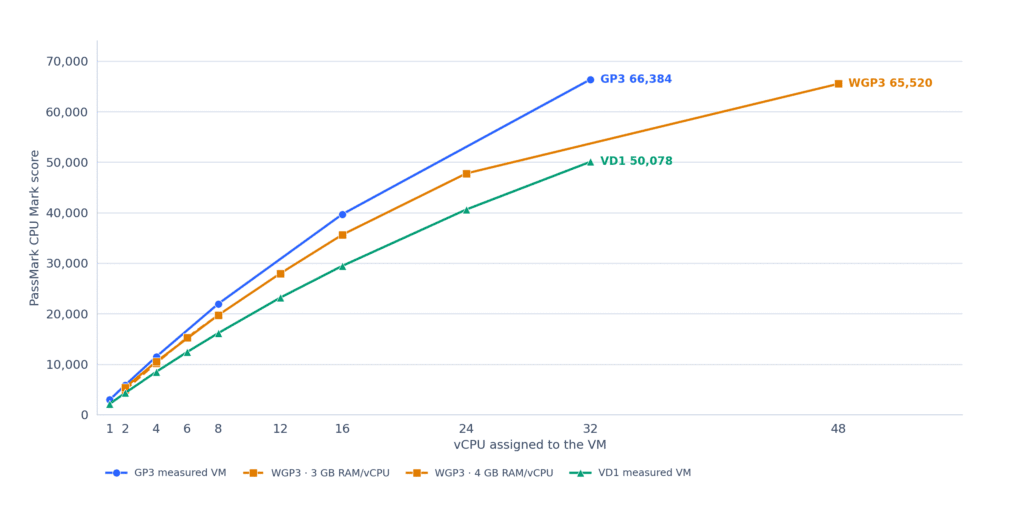
Chart 2. Average PassMark CPU Mark scores by vCPU count.
Chart 2 shows how CPU Mark grows with plan size. If doubling the vCPUs doubled the score, each line would be perfectly straight. Every line curves slightly instead, so each extra vCPU adds a little less than the one before. A bigger plan still adds a lot. Moving from a 16-vCPU to a 32-vCPU GP3 plan raised CPU Mark by about two-thirds.
GP3’s and VD1’s largest plans reach roughly 70% of what perfectly linear scaling would give. WGP3 tracks GP3 up to 16 vCPUs, then flattens, reaching about half of linear scaling at 48 vCPUs. Its step from 24 to 48 vCPUs adds only about 37%.
Three things probably contribute to the curves:
- The benchmark. CPU Mark’s tests don’t all use extra threads equally well.
- Neighbouring VMs. On GP3 and WGP3, other customers’ VMs can compete for core time during a test.
- Physical cores on WGP3. Each WGP3 node has one 24-core processor, so a 48-vCPU VM at full load has twice as many busy vCPUs as the host has physical cores. vCPUs that share a core get through less work than vCPUs with a core each, which may help explain why WGP3 flattens beyond 24 vCPUs.
Real applications won’t follow these curves exactly.
What the scores mean for choosing a plan
In all three families, per-thread speed holds steady as plans grow, and each step up brings a substantial gain in CPU Mark.
VD1 uses the AMD EPYC 9734, a 112-core Bergamo processor, and fitting that many cores within one chip’s power and cooling limits means lower clock speeds than the Genoa processors behind GP3 and WGP3. GP3 scores about a third higher than VD1 on both measures, in line with the gap in rated clock speeds. Even so, VD1’s Single Thread scores are only about 10% below PassMark’s public average for the EPYC 7763 that ran our previous VPS platform.
In return for its lower clock speed, VD1 gives each vCPU a dedicated core, 4 GB of RAM per vCPU, and 35 TB of monthly traffic, compared with 25 TB on GP3. Some of our customers tested both ranges, found VD1’s per-thread performance sufficient, and chose it for those reasons.
As a rough guide, these are the families to start with:
- GP3 for Linux applications that lean on one busy thread, or that have mixed, bursty load like a typical web server. It has the highest per-thread speed in our range.
- VD1 for work that keeps many threads busy for long stretches, where dedicated cores matter more than per-thread speed.
- WGP3 for Windows workloads.
Individual VPS orders come with a 30-day full refund, so you can test your own application first. For larger deployments, contact us and we can set up free test VMs.
Richard Sutherland,
Technical writer, ServeTheWorld