

Introduction
In Part 1, we established that DNS is the system that translates domain names into IP addresses. You might have noticed something: there are a lot of companies involved in making that translation work. You bought your domain somewhere. Your website files are hosted somewhere. Your DNS records might be managed somewhere else entirely. Who actually does what? This tutorial untangles the cast of characters.
The Four Roles: Domain Registry, Registrar, DNS Hosting, & Your Web Host
Managing a domain involves four distinct jobs. Sometimes a single company handles all four. Sometimes the work is spread across two, three, or even four different providers. Neither arrangement is inherently better — what matters is that you know who’s doing what, so you know where to go when something needs to change.
1. The Registry
A registry is the organization that owns and operates an entire top-level domain (TLD) — the part after the final dot, like .com, .no, or .org. The registry maintains the master database of every domain name registered under that TLD.
Think of it like phone numbers. Every country has an authority that manages the numbering plan, handling which numbers exist and which blocks are assigned to which providers. That authority doesn’t sell you a phone number directly, but nothing would work without their system.
In the domain world, Norid is the registry for .no and Verisign is the registry for .com.
You’ll rarely interact with a registry directly. They work behind the scenes, setting the rules and maintaining the infrastructure that makes an entire TLD function.
2. The Registrar
A registrar is the company you actually buy your domain name from. They’re accredited by the relevant registry to sell domain names and handle the registration paperwork on your behalf.
Back to the phone authority analogy: the registrar is like your telecom provider. You pick a number, sign the contract, and pay the bill through them. They handle the behind-the-scenes coordination with the numbering authority.
ServeTheWorld is a registrar for .no domains, which means when you register a .no domain through STW, we communicate directly with Norid to secure that name for you. STW also sells other domain extensions like .com and .net through partnerships with higher-level registrars.
When you need to renew your domain, update WHOIS contact information, transfer a domain to or from another provider, or enable a registrar lock — the registrar is where that happens.
3. The DNS Host
A DNS host (sometimes called a “DNS provider”) is the company that runs the nameservers where your domain’s DNS records live. These are the servers that answer the question “What’s the IP address for this domain?” when the DNS system comes looking.
This is the role we’ll interact with the most throughout the rest of this series. Your DNS host is where you go to create, edit, and delete DNS records — A records, MX records, CNAME records, and everything else we’ll cover in Part 3 onward.
The DNS host doesn’t store your website files or handle your email. It stores instructions — a set of records that tell the rest of the internet where to find your website, where to deliver your email, and how to verify your domain’s identity.
4. The Web Host
A web host (or hosting provider) is the company that stores and serves your actual website files. When a visitor’s browser has resolved your domain name to an IP address (thanks to DNS), it connects to a web server — and that server is provided by your web host.
ServeTheWorld offers several types of web hosting: shared web hosting, WordPress hosting, and VPS (Virtual Private Server) plans for those who need more power and control.
The web host is responsible for keeping your site online, fast, and secure. But it doesn’t control your domain name or your DNS records — unless it also happens to be your DNS host (which is common and worth understanding).
| Task | Who controls it | Where to change it |
|---|---|---|
| Maintain the LTD master database | Registry | Not user-accessible |
| Register or renew your domain name | Registrar | Registrar control panel |
| Change which nameservers your domain uses | Registrar | Registrar control panel |
| Create, edit, or delete DNS records | DNS host | DNS zone editor |
| Host your website files | Web host | Hosting control panel |
One Company, Many Hats
Many companies, including ServeTheWorld, fill more than one of these roles at the same time. STW is a registrar and a DNS host and a web host and an email provider. When you register a domain and buy hosting through STW, a single company is wearing all four hats.
This is convenient for you. Everything is in one place. One login, one support team, one invoice. You don’t need to coordinate between different companies when something changes.
But it’s not the only way to set things up. Plenty of people register their domain with one company, host their DNS with a second, and run their website on a third. That adds flexibility and avoids single points of failure.
Neither arrangement is wrong. The important thing is knowing which company is handling which role, so you know where to go when you need to make a change.
Web Hosting vs. DNS Hosting
This distinction trips up a lot of beginners, so it’s worth emphasizing: DNS hosting and web hosting are two different things, even when the same company provides both.
- DNS hosting stores instructions — records that tell the internet where to find your services. “Send web traffic here. Send email there. This subdomain points to that server.”
- Web hosting stores files — the HTML, CSS, images, and application code that make up your website.
This separation is one of DNS’s greatest strengths. It lets you swap out individual services — a new web host, a different email provider, a CDN — without changing your domain name or disrupting unrelated services.
Step 1 — Find Your Way Around the STW Control Panel
Now that you know the roles, let’s put them in context. If you have a ServeTheWorld account, you can follow along and see exactly where each role lives inside the control panel. If you use ServeTheWorld only for VPS hosting and keep your domains and DNS elsewhere, some of the functions below will be handled by your registrar and DNS host.
Domains (Registrar Functions)
- Log in to https://my.servetheworld.net.
- Click Domains in the left sidebar.
- Click My Domains.
This is the registrar side of STW. From here, you can manage the administrative aspects of your domains:
- Nameservers — Which DNS host should answer queries for this domain. (If you use STW for DNS hosting, these include
ns3.servetheworld.netandns4.servetheworld.net.) - WHOIS Contact Information — The public ownership details attached to the domain.
- Registrar Lock — A safety switch that prevents unauthorized transfers (covered in Part 10).
- Renewal — Manage whether the domain auto-renews or expires.

DNS Manager (DNS Hosting Functions)
This is where you manage the DNS records that tell the internet where to find your services:
- From the STW control panel, click Domains.
- Click DNS Manager.
- Click Edit DNS Zone next to the domain you want to edit.
Here you can add or edit individual records (A, MX, CNAME, etc.). The interface allows you to:
- Add New Records — Create new instructions for your domain.
- Edit Existing Records — Update IP addresses or mail servers.
- Delete Records — Remove old or unused entries.
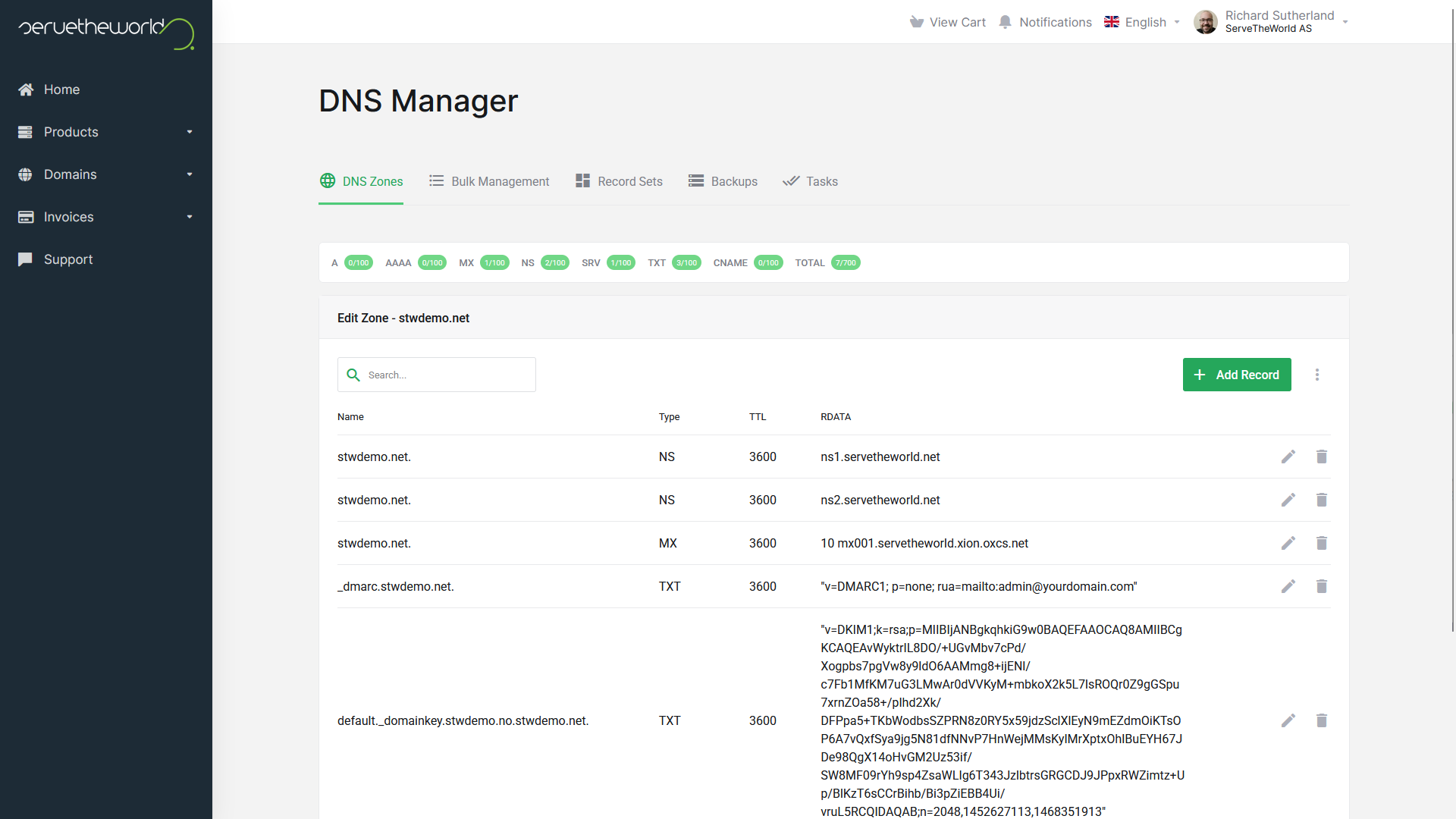
We’ll spend a lot of time here as the series progresses. For now, simply knowing how to navigate to this screen is the goal.
Using another provider for DNS? If your domain’s nameservers are handled elsewhere (e.g. Cloudflare), you will not edit DNS records in the STW control panel. You’ll edit them in your DNS provider’s admin panel. We’ll cover how to confirm this and choose the right editor in Part 4.
Step 2 — Check Your Domain’s Nameservers
Here’s a quick hands-on exercise to connect the theory to your own domain. Let’s check which nameservers your domain is currently using. This tells you who your DNS host is.
Open a terminal (or use the Google Admin Toolbox Dig Tool if you prefer a browser) and run:
nslookup -type=NS example.comYou should see output similar to:
Server:  192.168.1.1
Address: 192.168.1.1#53

Non-authoritative answer:
example.com nameserver = ns4.servetheworld.net.
example.com nameserver = ns3.servetheworld.net.
The nameserver lines tell you which servers are responsible for answering DNS queries about example.com. In this case, they’re ServeTheWorld’s own nameservers — which confirms that STW is both the registrar and the DNS host for example.com.
Try it with your own domain. Replace
example.comwith your domain name and see what comes back. If the nameservers belong to your registrar, they’re probably also your DNS host. If the nameservers belong to a different company, that company is your DNS host.
Conclusion
You now know the four key players in the domain ecosystem: the registry (rule maker), the registrar (storefront), the DNS host (directory manager), and the web host (file storage). You understand that these roles can be filled by one company or several, and you’ve seen where each role lives inside the ServeTheWorld control panel.
In Part 3, we’ll open up the DNS zone itself and look at the individual record types — A, MX, CNAME, and TXT — that make all of this routing work.
Next steps: